A customer walks up to your counter and says, “I have USDC in Samsung Wallet. Can I pay?” The useful merchant response depends on the payment flow you can actually support, the amount due and how staff will confirm receipt.
Samsung Wallet's new Stablecoin Account makes that a timely question. Solana's November 5 announcement says the feature went live on November 2, 2026, bringing Solana USDC access to eligible U.S. Galaxy users. See the official launch announcement.
PayIn has not verified direct Samsung Wallet checkout compatibility. This is an independent merchant-readiness guide, not a Samsung integration announcement or partnership claim.

AI-generated concept illustration, not a Samsung Wallet or PayIn screenshot. The separate scenes represent consumer access and merchant preparation; they do not demonstrate a connection between the products. The scan-like pattern is nonfunctional.
What actually launched?
The announcement describes buying, holding, sending and receiving USDC. It cites approximately 82 million compatible U.S. Galaxy devices: a device footprint, not a count of active accounts, shoppers or merchant payments. It also describes transfers to compatible external wallets and eligible bank destinations. Online and in-store stablecoin payments remain areas Samsung expects to explore, subject to regulation. Source: Solana Foundation.
Samsung's Stablecoin Account FAQ specifies eligible U.S. adults, excludes New York residents and requires a supported device running Android 13 or later with fingerprint authentication. Opening the account involves identity verification. It is a custodial service; users should follow the current in-app availability and provider requirements.
For a shop, our interpretation is that familiar consumer interfaces could reduce the effort of obtaining a usable USDC balance. The announcement does not establish how many customers will choose to spend it at your counter.
Sending USDC and completing a merchant checkout are separate capabilities
A merchant needs to know more than whether a wallet holds the right token. Can the customer open the payment request? Can that wallet follow the requested authorization flow? Will the merchant receive a completed record tied to that request?
| Capability | What to establish before advertising it |
|---|---|
| Send USDC to an external wallet | The provider supports the intended asset, network and destination |
| Use a merchant's web checkout | The wallet supports that checkout's connection and authorization flow |
| Scan a counter QR | Whether it opens a web page, encodes a transfer or uses another supported format |
| Pay by tapping a contactless terminal | A specifically supported contactless payment flow; a USDC balance alone does not establish it |
| Trigger a merchant notification | The payment processor has verified the relevant operation, rather than merely observing a wallet connection |
Samsung's FAQ documents an external-wallet send flow using a recipient address. That is not evidence that Samsung Wallet can connect to PayIn and authorize its checkout. Sharing Solana as a network also does not establish compatibility with a particular x402 implementation.
Do not label a PayIn QR “Pay with Samsung Wallet” on the strength of this news. PayIn's QR opens a web payment page. A manual transfer outside that flow is not guaranteed to appear in PayIn's history or trigger its POS announcement.
What to do when a customer asks at the counter
For an illustrative 18 USDC coffee-and-pastry order, the clerk should establish the amount and available payment method before the customer submits anything.
- Check the offered flow. Use the wallet choices and instructions actually presented by your payment page. Do not infer Samsung Wallet support from a Solana logo.
- Resolve uncertainty before sending. If direct compatibility is unverified, say so and offer another payment method your shop already supports. Do not ask a queued customer to perform an improvised transfer as an integration test.
- Keep the order identifiable. Retain the order slip and total while the buyer completes a supported flow. Two customers owing 18 USDC still need separate payment matches.
- Confirm before handover. Check the new completed payment and amount. A customer's screenshot, an approval prompt or a previous announcement is not enough.
If the customer has already submitted a transfer, keep its reference and investigate that operation before asking them to pay again. The verification guide explains the status, asset, recipient and amount checks. An outside transfer needs its own reconciliation rather than an assumption that PayIn will recognize it.
Prepare the merchant side independently of this announcement
For a supported Solana checkout, prepare your own receiving wallet and its associated USDC token account before serving customers. The receiving-account guide distinguishes the wallet address, official USDC mint and ATA. Use the address walkthrough if you still need to locate the public wallet address.
Then design the counter around the people using it:
- A readable request: a recognizable merchant title and an agreed USDC amount.
- A customer-facing screen: the tablet's QR faces the buyer and stays clear of glare or packaging.
- An audible cue: activate sound on the actual counter device, with an announcement language staff understand.
- A handover decision: match a newly completed receipt to the current order; sound attracts attention but does not identify the buyer.
This is where a payment tool adds value beyond displaying a wallet address. A clerk wrapping an order should not need to reopen the owner's wallet every time a customer says they have paid. The scan-to-handover walkthrough covers the operating sequence, including ambiguous payments and queues.
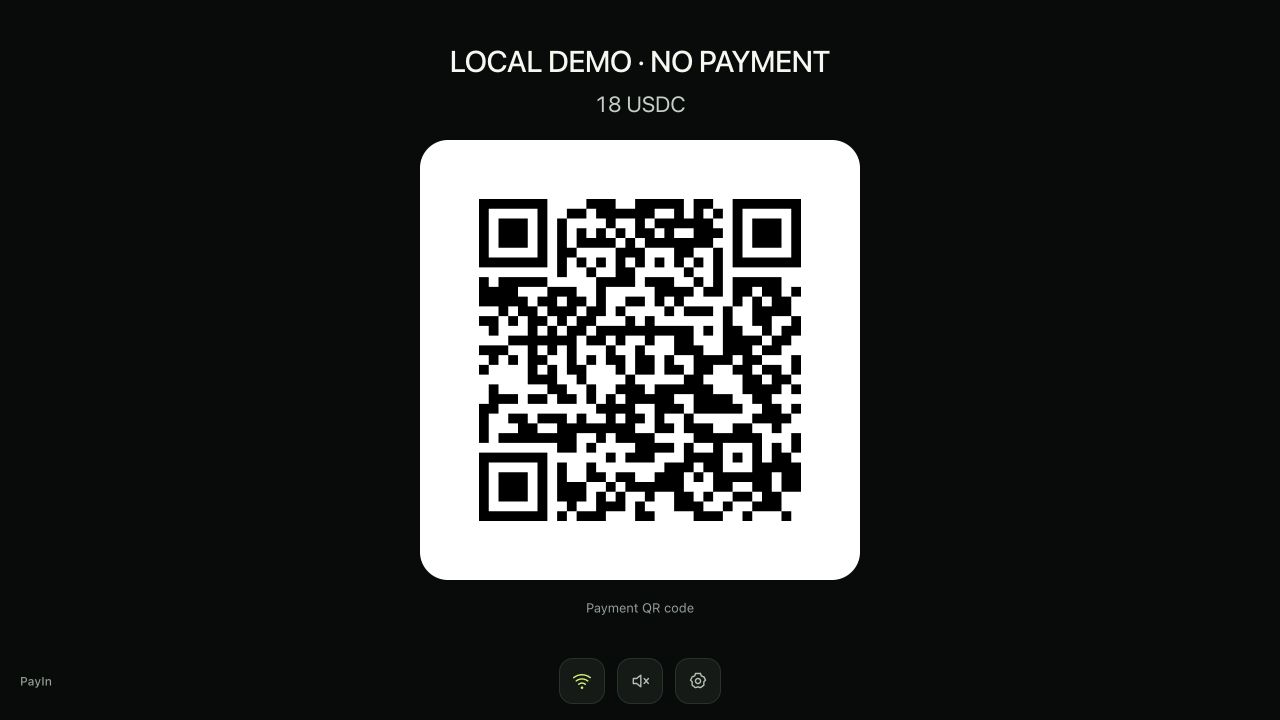
Actual PayIn interface captured in a local simulation, labeled LOCAL DEMO · NO PAYMENT. The sample QR opens a public guide. This shows the display layout, not Samsung Wallet compatibility or a real payment.
What PayIn can help with today
PayIn provides a USDC payment link for sharing a request and a customer-facing POS display with visible feedback and optional spoken amounts for supported checkout payments. Owners retain private management access while staff can use the separate display link.
PayIn is currently free to create and use without merchant registration. That does not remove a customer's wallet-provider signup, identity checks or external costs, and it is not a promise of permanent pricing. Samsung's FAQ says fees and processing times vary by operation and provider; check the actual transaction details rather than describing the entire funding-to-payment journey as free.
For online sales, the same merchant need extends beyond showing an address: share the request through a website button and use verified callbacks rather than a browser redirect alone when building fulfillment. Those are separate merchant workflows, not newly announced Samsung features.
What would justify a Samsung Wallet payment tutorial?
A useful compatibility tutorial would need evidence that the actual wallet can open and authorize the intended checkout, plus verification that the resulting payment is correctly recorded. Until that is established, we are not publishing Samsung Wallet connection instructions or claiming direct support.
Our merchant takeaway is straightforward: broader access to USDC creates a reason to prepare clear receiving and checkout operations. The shop still needs to decide which flows it accepts, how staff notice receipt and when an order can leave the counter.
Published by PayIn. Independent analysis based on the linked official sources, checked November 6, 2026. PayIn is not announcing an affiliation with Samsung, Bastion or Coinbase. Article and concept illustration produced with AI assistance and editorial fact-checking.